Managing your payroll records shouldn’t be complicated. If you’re a Lowe’s employee, the MyLowe’sLife portal gives you full access to your pay stubs, W-2 forms, and other essential HR tools—all in one place.
In this 2026 guide, you’ll learn exactly how to log in, download your pay stubs, and retrieve your W-2 forms quickly and securely.
Need pay stubs urgently? Use a paystub creator free to create professional documents in minutes.Perfect for income verification, loans, or rental applications.
What Is the Lowes Employee Login Portal?
The Lowe’s employee login portal, commonly known as MyLowe’sLife, is the official online system used by employees to manage their work-related information.
Through this portal, you can:
- View and download pay stubs
- Access W-2 tax forms
- Update direct deposit details
- Check benefits and schedules
- Manage personal HR information
The portal is available 24/7 and can be accessed from any device with an internet connection.
How to Access Lowes Employee Login
Follow these simple steps to log in:
- Visit the official portal:
MyLowe’sLife (myloweslife.com) - Enter your:
- Sales Number (Employee ID)
- Password
- Click Login to access your dashboard
Once logged in, you’ll have full access to your payroll and HR tools.
How to Get Pay Stubs from Lowe’s Employee Portal
Getting your Lowes pay stubs is quick and easy through the portal.
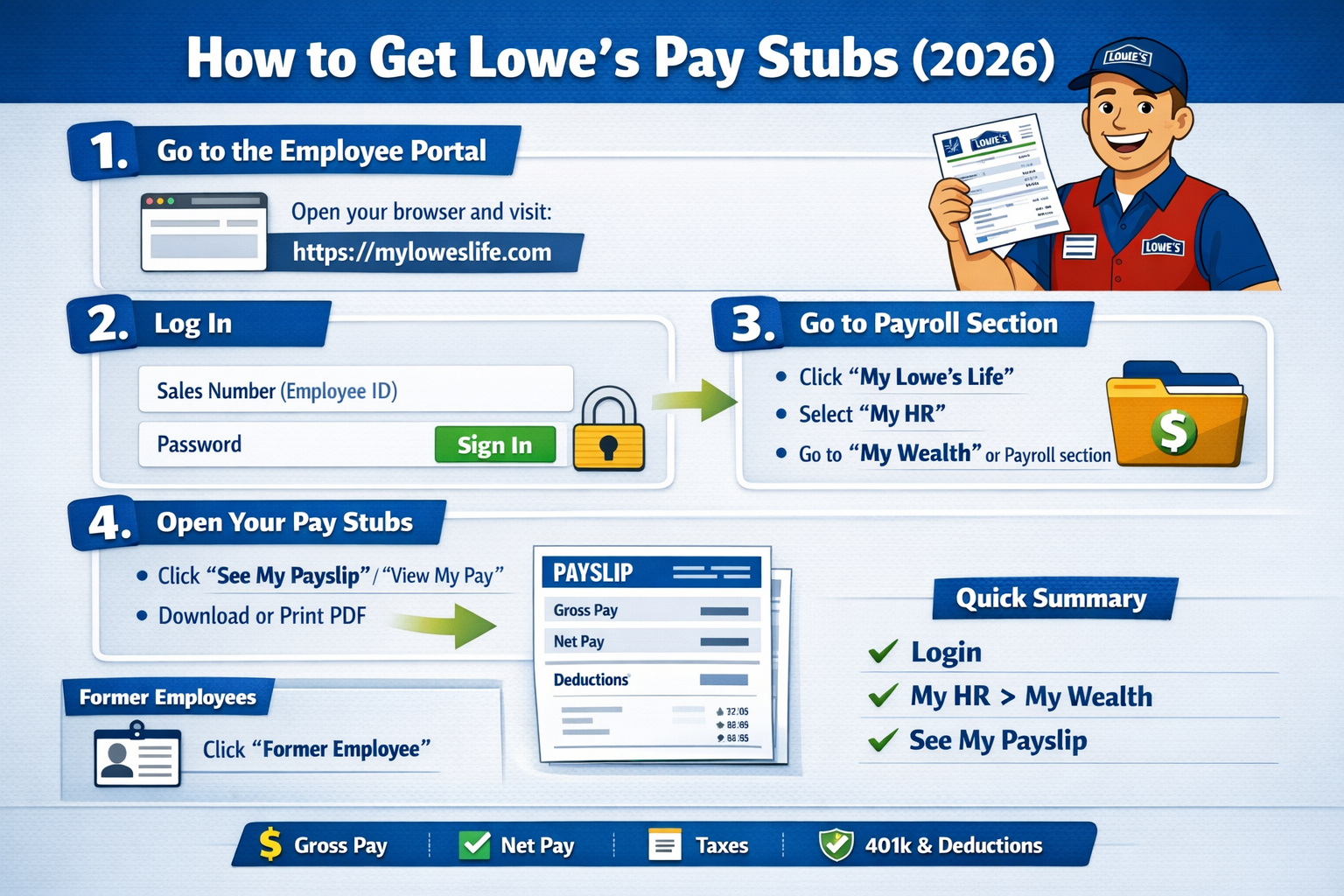
Step-by-Step Guide:
- Log in to your MyLowe’sLife account (myloweslife.com login page)
- Navigate to My HR
- Click on See My Payslip
- Select the pay period you want
- Download or print your pay stub
Your pay stub will include:
- Gross pay
- Net pay
- Tax deductions
- Benefits deductions
- Year-to-date earnings
Create your paystub in minutes?
Try our free payroll stub generator today and discover how easy payroll can be!
How to Get Your W-2 From Lowe’s
For Current Employees:
- Log in to MyLowe’sLife at myloweslife.com
- Go to My Wealth
- Select Payroll Services
- Click W-2 Services
- Choose Get Your W-2 Now
W-2 forms are usually available by January 31 each year.
For Former Employees:
If you no longer work at Lowe’s, you can still access your W-2 online.
Steps:
- Visit the tax form provider (like Equifax/MyTaxForm)
- Enter employer code: 11116
- Verify your identity
- Download your W-2
Former employees typically have limited access to the main portal, so it’s best to retrieve documents early.
Lowes Former Employee Login Guide
Former employees can still access certain records:
- Visit the MyLowe’sLife login page
- Click “Former Employee”
- Follow instructions to retrieve pay stubs or documents
In most cases, access may only be available for a limited time after leaving the company.
Common Login Issues & Fixes
If you’re having trouble logging in, try these quick fixes:
- ✅ Check your login credentials (case-sensitive)
- ✅ Clear browser cache & cookies
- ✅ Use a different browser or device
- ✅ Reset password using “Forgot Password”
- ✅ Contact HR if your account is locked
These steps resolve most login problems quickly.
Why You Might Need Your Pay Stubs & W-2
Your payroll documents are essential for:
- Filing taxes
- Applying for loans
- Renting an apartment
- Proof of income verification
Having quick access to these documents can save you time and avoid unnecessary stress.
Pro Tip: Need Pay Stubs Instantly?
If you can’t access your Lowe’s account or need documents urgently, you can use a paystub generator to create professional pay stubs in minutes.
Final Thoughts
The Lowes employee login at myloweslife.com makes it easy to manage your payroll records, whether you’re a current or former employee. From downloading pay stubs to accessing W-2 forms, everything is just a few clicks away.
Make sure to keep your login details secure and download important documents regularly to avoid last-minute issues.
Disclaimer: Paystub Generator Free is not affiliated with Lowe’s. The blog provides general guidelines for the Lowe’s pay stub. Refer to the official Lowe’s website and consult HR for specific information.
FAQs
1. How do I reset my Lowes login password?
Click “Forgot User ID or Password” on the login page and follow the instructions.
2. When are W-2 forms available?
W-2 forms are typically available by January 31 each year.
3. Can former employees access pay stubs?
Yes, but only for a limited time through the portal or HR support.
4. What is the employer code for Lowes W-2?
The employer code is 11116 for tax form access.