Is It Safe to Use a Paystub Generator in 2026?

A Paystub generator allows the creation of check stubs without real knowledge of a paycheck. It allows users to input the particulars, such as the name of the employee, pay period, wages, deductions, taxes, and other financial information.

Using a Paystub Generator can be safe if you choose a trusted and secure platform, but users should be cautious about accuracy, data security, and compliance. Some free tools may lack proper tax calculations, security encryption, or legal compliance, which can lead to inaccurate documents or potential data risks.

The tool finds its utility mostly with freelancers and small business owners or anyone who issues pay stubs without a formal payroll system. It ensures the transparency of the payment process, which can then be used for record-keeping purposes, tax filing purposes, or even as proof of income.

Why You Need a Customizable Paystub Generator for Your Business?

Is it Safe to Use Paystub Generator?

Using a Paystub generator for free comes with a big fat warning depending on who runs the business.

Here are a few pointers you would want to check before making your move:

Below are some things to keep in mind before you use them:

  • Security Breaches: As with free services, the level of security may not be as strong as in paid services; hence there may be certain compromises in protecting your personal and financial information.
  • It becomes a risk to provide any sensitive information such as name, address, or anything related to the employer for identity theft should the service provider choose not to enforce any security measures. 
  • Accuracy and Compliance: While some free check stub generators are available online, the validity is ever questionable and, therefore, could result in blockages, especially if check stubs become proof for verifying, e.g., loans. An error in your stub would be any tax withholding discrepancies.
  • Hidden Charges: Most free services would not seem bothersome, but some will present hidden charges after the stub has been generated, or they may attempt to up-sell you to additional services. There is a risk of harmful malware collecting unnecessary personal data.
  • Legal Implications: If you’re using a check stub generator for free for fraudulent purposes, then it’s illegal and can have dire consequences.

What Are Paystub Generator?

A paystub generator is a tool that assists the user in generating and printing pay stubs for employees. These are the documents that accompany the payroll checks and demonstrate an employee’s gross income, deductions, and net pay.

Check stub generators are typically utilized by smaller businesses who, for whatever reason, need to supply pay stubs to individuals but are not using a full payroll service.

How Paystub Generator Work?

The following procedures will shine a light on the working of a check stub generator:

Insert Details:

  • Employee Information: It requires the employee’s name, address, and social security number.
  • Pay Period: The beginning and ending dates of the payment period need to be entered, whether weekly, bi-weekly, or monthly.
  • Earnings: Gross earnings should be input, which may include a monthly salary, hourly wages, overtime payment, commission, or bonus.
  • Deductions: Insert any deductions that may apply, including state and federal taxes, social security, medicare, and retirement plan contributions.
  • Employer Contributions: Some generators allow the employer to insert matching contributions, such as health insurance.

Automatic Calculations:

Once all data have been inserted, every check stub generator will automatically calculate:

  • Gross payment: Total earnings before any deductions
  • Deductions: The taxes and benefits deducted from the gross payment
  • Net payment: The final amount that the employee receives after the deductions have been applied

Formatting:

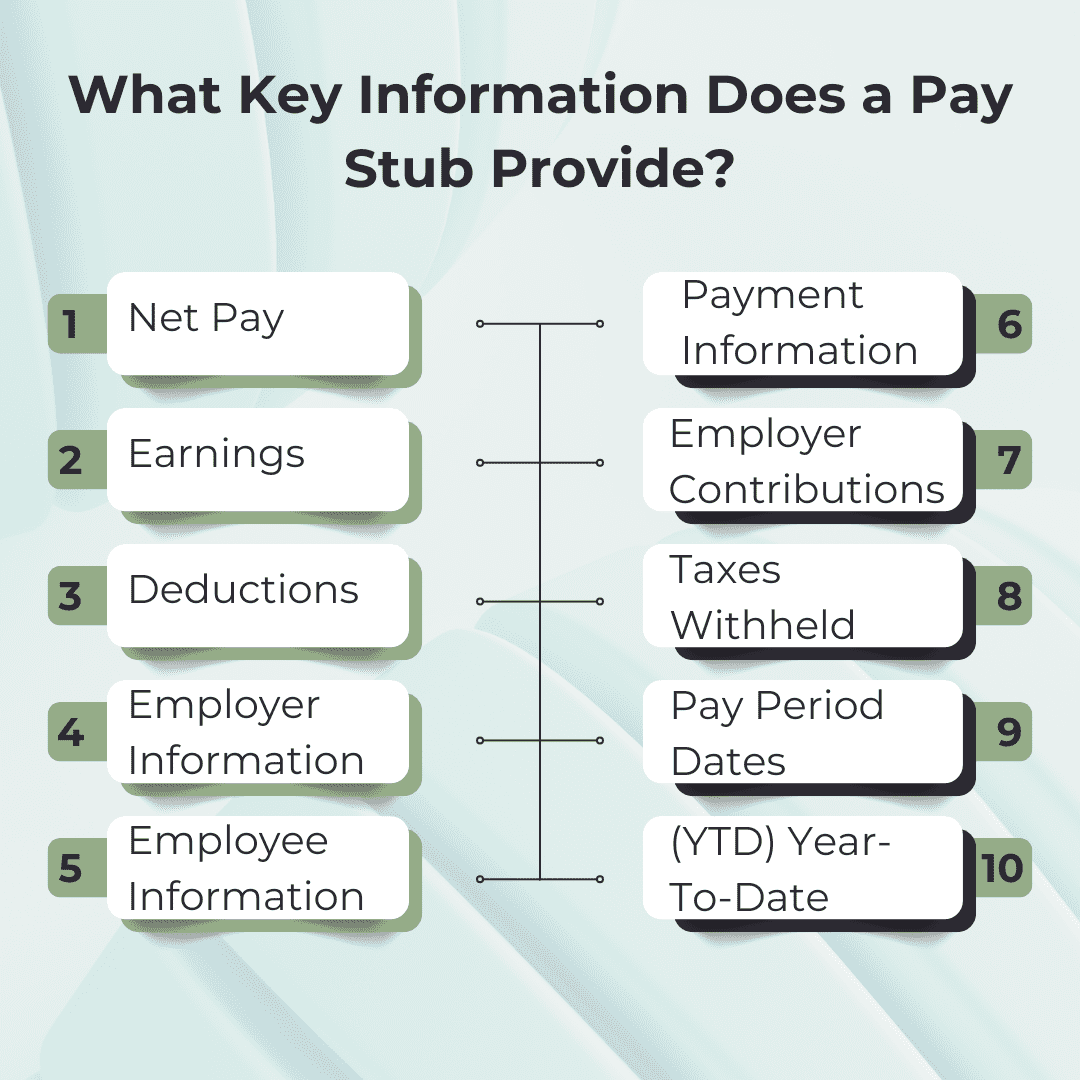
The Paystub Generator will insert the information provided into a standard check stub layout, including: 

  • Employer’s and employee’s details
  • Pay period dates
  • Earnings and deductions
  • Employer’s contributions
  • Year-to-date (YTD) totals

Preview and Customization:

Thus, most check stub generators will let you preview the pay stub before you go into printing or saving it. There may be some customization options, such as inserting company logos, changing fonts, or even adding more fields.

Print & Download:

Did you find the pay stub you like? Users can download a PDF version of it or print it directly.

Top Reasons Why Businesses Need a Paystub Generator

Types of Paystub Generator: Free vs. Paid

A Paystub generator is available in both versions: free and paid. Below is a detailed description of the two:

Features Free  Paid
Cost Free Paid (One-Time Fee)
Customization Limited Extensive
Tax calculations Manual Automated tax calculations
Legal Compliance Might not comply with the current laws Regular updates to comply with legal standards
Support No customer support Dedicated customer support
Number of stubs Limited per month Higher limits
Payroll Features Basic Advanced

Why Use a Paystub Generator?

A Paystub Generator is a tool that helps generate paycheck stubs in no time. It helps employees and employers, as follows are the reasons for you to use it:

Below are mentioned why you should use them:

Accuracy & Compliance:

  • Automated Calculations: Check stub generators help you automatically calculate deductions such as tax, benefits, and other withholdings, which helps ensure accuracy in your payroll.
  • Tax Compliance: These pay stub generators ensure that the pay stubs are compliant with local, state, and federal tax regulations by mentioning all the necessary particulars, such as tax rates and amounts.

Save Time & Effort:

  • Fast & Easy: Instead of generating pay stubs manually, a check stub generator will give you templates where you just fill in the required information, saving you time.
  • Instant Accessibility: The stub can be generated on demand, unlike having to wait for payroll software to process it.

Professional Appearance:

  • Systematically Organized: A generated check stub usually has a more professional appearance than a handwritten one. This includes all of the standard fields required: company name, employee name, payment date, earnings, and deductions breakdown.
  • Customizable: Most generators would allow you to add your company logo, business name, and other personal information for a more professional look.

Record Keeping:

  • Digital Storage: Responsibility for accurate record-keeping is much easier with digital storage of the generated pay stubs for both employees and employers.
  • Tax Filing and Audits: Printed copies of pay stubs could be of great use during tax filing and audits.

Risks Associated with Paystub Generator

A Paystub Generator is an easy way of generating pay stubs, but there are certain risks associated with it that users should consider.

Data Privacy and Security Concerns:

  • Risk of Identity: Many free check stub generators require users to enter sensitive personal information such as name, address, social security number, and earnings details. If the service is not properly secured, hackers can expose this data.
  • Lack of Encryption: Some free tools might not use secure encryption protocols, making it easier for hackers to intercept sensitive information.

Non-Compliant Information:

  • Identity theft: Most free check stub generators require their users to input sensitive personal information like name, address, social security number, and earnings details. Hackers can access these details if the service is not properly secured. 
  • Lack of encryption: Some free tools do not use secure encrypted protocols, rendering it easy for hackers to intercept sensitive information.
  • Tax calculation errors: Most of the free paystub generators do not intrinsically offer you tight security. If the paystub-generating system does not calculate tax withholdings accurately, the deductions on the check stub may not stand as valid in a court of law.
  • Non-compliance with local regulations: Different states have different regulations governing pay stubs. These regulations will differ from the federal statutes. Free tools are hardly ever updated to reflect the recent changes in tax laws, thus causing outdated pay stubs.

Fake or Misleading Services

  • Fraud sites: Some of the websites are scams that provide check stub generators. These sites will look legitimate. They were designed to be acts of theft for personal information.
  • Fake Pay Stubs: If the service creates false pay stubs, the users may unknowingly present false information, which may be used for legitimate purposes and can be legally actionable.

Hidden Costs

  • Upselling: Most check stubs generator free will swear that they are free but would require you to make payments to access the stubs that are of high quality. This leads to unexpected costs.

No Employee Verification

  • These are paid, cheap, and free pay stub generators for which very little effort (if any) is made to verify whether the employee works for a firm and if employer information is verifiable. This absence of verification makes it that much easier to perpetrate fraud.

How to Create Payroll Check Stubs for Freelancers?

How to Evaluate the Safety of a Paystub Generator?

Choosing the safe way to generate stubs free is important so that your personal and financial information remains confidential.

Some parameters to look for when checking this are given below:

  • Research about the Provider: Create checks for reviews, its reputation, and years of opinion.
  • Verify the Security: Ensure that the site uses HTTPS along with SSL encryption and has a clear privacy policy.
  • Check for Compliance: Check for compliance with tax laws and lucid terms of service.
  • Evaluate User Interface: Look for transparency, usability, and clarity in pricing.
  • Try it on Trial: Try it with non-sensitive data.
  • Beware of Red Flags: Avoid tools without contact information and excessive advertisement.
  • Evaluate Output: Check for professional design and accurate details.
  • Evaluate Support: Contact customer service and check for responsiveness and reliability.
  • Get Used to Trustworthy Recommendations: Use recommendations from professionals.
  • Look Out for Activity-Monitoring: Keep an eye on records for unauthorized transaction breaches after using such sites.

Tips for Using Free Check Stub Generators Safely

Using check stub generators free is generally considered user-friendly and easy; however, without compromising safety, one would certainly be protecting one’s personal or financial information. This goes to say that the free check generator is put to safe use with the following tips:

  • Choose a Trustworthy Platform: Research a reliable paystub site. Check for user reviews, ratings, and testimonials. Confirm the generator uses SSL encryption to secure communications. 
  • Avoid Entering Sensitive Information: Therefore, do not enter sensitive data like social security numbers unless necessary.
  • Check for Legal Compliance: Check that the stub complies with legal requirements on check stub generators in your state. Verify that the stub contains requisite information: employer details, employee details, gross pay, and net pay. 
  • Use a Secure Device and Network: Avoid issuing pay stubs through public wifi. Ensure you have updated antivirus software used to safeguard the device from any malware attempts.
  • Go Through the Privacy Policy: Read through the site privacy policy to understand how the data might be used and if it might be stored alongside third parties.
  • Be Wary of Hidden Charges: Some free pay stub generators may charge hidden costs. Check the pricing thoroughly before entering your details. 
  • Verify the Results for Accuracy: Review the stub again for errors, which might cause complications for your employees. 
  • Make Sure to Monitor Financial Accounts: Watch over some unauthorized activity posts using various online tools.
  • Keep Backup and Records: Secure an extra copy of the generated pay stub for reference down the line.

Key Takeaways

Using Paystub Generator can be safe and beneficial if caution and common sense are exercised. It affords immediate opportunities to create professional-looking pay stubs for personal or business needs, particularly for small businesses and freelancers who are on tight budgets.

While check stub generators for free are very convenient and inexpensive, users must be watchful for a reliable provider and protect their information. When in doubt, paid or professional alternatives should be considered to safeguard against security breaches and noncompliance.

Frequently Asked Questions (FAQ)

1. Is it safe to use a paystub generator in 2026?

Yes, it is safe if you use a trusted and secure platform. However, free or unverified tools may pose risks related to data privacy, accuracy, and compliance.

2. Are free paystub generators reliable?

Free paystub generators can be useful for basic needs, but they may lack accurate tax calculations, strong security, and legal compliance compared to paid tools.

3. Can I use a paystub generator as proof of income?

Yes, pay stubs generated from legitimate and accurate platforms are commonly accepted as proof of income for loans, rentals, and financial verification.

4. Is using a paystub generator legal?

Yes, it is legal as long as the information entered is accurate and not used for fraudulent purposes.

5. Do paystub generators calculate taxes automatically?

Some advanced or paid paystub generators calculate taxes automatically, while free tools may require manual input or provide limited accuracy.

6. What are the risks of using a paystub generator?

Risks include data security issues, incorrect tax calculations, hidden charges, and potential misuse of sensitive information if the platform is not secure.

7. Who should use a paystub generator?

Freelancers, small business owners, contractors, and self-employed professionals who do not use full payroll systems commonly use paystub generators.


Why You Need a Customizable Paystub Generator for Your Business?

Managing payroll is one of the most important responsibilities for any business, whether it is a startup, small business, or growing enterprise. Employees expect accurate and professional pay documentation, while businesses must ensure compliance with tax regulations and maintain proper financial records.

This is where a customizable paystub generator becomes essential.

Unlike manual payroll calculations or generic templates, a customizable paystub generator allows businesses to create accurate, branded, and fully structured pay stubs in minutes. It reduces errors, saves time, and ensures consistency across all payroll records.

In this guide, you will understand why businesses increasingly rely on paystub generators and how they improve payroll efficiency, compliance, and professionalism.

What Is a Custom Paystub Generator?

A custom paystub generator is an online tool that allows employers to create professional pay stubs tailored to their business needs.

It typically includes options to custom:

  • Employee details
  • Earnings (hourly, salary, overtime, bonuses)
  • Deductions (taxes, insurance, benefits)
  • Net pay calculations
  • Company branding (logo, business name, design format)

Instead of manually calculating payroll data, the system automatically generates accurate pay stubs in a standardized format.

This ensures both accuracy and professionalism in payroll documentation.

Why Manual Paystub Creation Is a Problem

Many small businesses still rely on manual methods or spreadsheets to create pay stubs. However, this approach comes with multiple challenges:

1. Time-Consuming Process

Calculating gross pay, taxes, overtime, and deductions manually takes significant time, especially for businesses with multiple employees.

2. High Risk of Human Errors

Even a small mistake in tax calculation or overtime hours can lead to incorrect pay stubs, causing employee dissatisfaction or compliance issues.

3. Tax Complexity

Payroll taxes vary by region, income level, and employment type. Keeping up with constantly changing tax regulations is difficult without automation.

4. Poor Record Management

Manual pay stubs are harder to organize, store, and retrieve during audits or financial reviews.

5. Inconsistent Formatting

Different formats across pay stubs can create confusion for employees and make financial documentation look unprofessional.

These challenges highlight why businesses are shifting toward automated solutions.

Key Benefits of a Customized Paystubs Generator

A modern paystub generator is more than just a tool—it is a complete payroll efficiency system.

 1. Accuracy in Payroll Calculations

Automated systems eliminate manual errors by calculating:

  • Taxes
  • Gross wages
  • Deductions
  • Net salary

This ensures every pay stub is mathematically correct.

 2. Saves Time and Effort

Instead of spending hours preparing payroll, businesses can generate pay stubs in minutes with just a few inputs.

 3. Professional and Standardized Format

Every pay stub follows a structured format, improving clarity and making financial documents easier to understand.

 4. Better Compliance with Tax Regulations

Accurate payroll records help businesses stay compliant with local tax laws and reduce the risk of penalties.

 5. Easy Record Keeping

Digital pay stubs are easy to store, access, and manage, making audits and financial reporting much simpler.

How Customization Improves Business Branding and Trust

One of the biggest advantages of a customizable paystub generator is branding flexibility.

Businesses can include:

  • Company logo
  • Business name and details
  • Custom layout design
  • Professional formatting

This creates a consistent brand identity across all employee documents.

Why this matters:

  • Employees trust well-structured, branded pay stubs
  • It improves company credibility
  • It enhances internal communication transparency
  • It gives a professional impression during audits or loan verification

A custom pay stub is not just a document—it is a reflection of your business professionalism.

Ready to simplify your payroll process and eliminate manual errors?

Try our free payroll stub generator today and discover how easy payroll can be!

Generate Paystub Now 

How Paystub Generators Help Small Businesses and Freelancers

Paystub generators are not only for large corporations. They are extremely useful for:

Small Businesses

  • Simplify payroll management
  • Reduce dependency on accountants
  • Maintain clean financial records

Freelancers and Contractors

  • Proof of income for loans or rentals
  • Easy tax documentation
  • Clear income tracking

Startups

  • Low-cost payroll solution
  • Scalable for growing teams
  • Saves HR workload

Cost Efficiency: Reduce Payroll Expenses

Using a customizable paystub generator can significantly reduce business costs.

Instead of outsourcing payroll services, businesses can:

  • Eliminate third-party payroll fees
  • Reduce administrative workload
  • Minimize accounting errors
  • Save time spent on manual processing

For growing companies, this leads to long-term financial efficiency.

Digital Paystubs vs Paper Paystubs

Paper Paystubs

  • Time-consuming to prepare
  • High printing and storage costs
  • Risk of loss or damage
  • Difficult to organize

Digital Paystubs

  • Instant generation
  • Secure and cloud-based storage
  • Easy access anytime
  • Environmentally friendly
  • Standardized format

Clearly, digital paystubs are the future of payroll management.

Why Businesses Prefer Automated Paystub Tools

Modern businesses are shifting toward automation because it provides:

  • Faster payroll processing
  • Reduced human workload
  • Greater financial accuracy
  • Better employee transparency
  • Improved compliance management

Tools like paystub generator help businesses generate accurate, professional pay stubs with ease while maintaining consistency and reliability in payroll operations.

Final Thoughts

A custom paystub generator is no longer just an optional tool—it is a necessary part of modern payroll management.

It helps businesses:

  • Improve accuracy
  • Save time
  • Ensure tax compliance
  • Maintain professional records
  • Strengthen employee trust

Whether you are a small business owner, freelancer, or HR manager, switching to a digital paystub generator can significantly simplify your payroll process and improve overall efficiency.

If your goal is to streamline payroll and eliminate manual errors, adopting a customizable paystub solution is one of the smartest decisions you can make for your business.


FAQS:

1. What is a custom paystub generator?

A custom paystub generator is an online tool that allows businesses to create professional pay stubs by adjusting earnings, deductions, taxes, and branding elements according to their payroll structure.

2. Why should businesses use a paystub generator instead of manual payroll?

Manual payroll is time-consuming and prone to errors. A paystub generator automates calculations, reduces mistakes, ensures compliance, and creates consistent and professional payroll documents.

3. Can small businesses and freelancers use a paystub generator?

Yes, paystub generators are ideal for small businesses, startups, and freelancers. They help track income, provide proof of earnings, and simplify tax reporting and financial documentation.

4. How does a customizable paystub generator improve accuracy?

It automatically calculates gross pay, taxes, overtime, and deductions, reducing the risk of human errors that often occur in manual payroll processing.

5. Are digital pay stubs better than paper pay stubs?

Yes. Digital pay stubs are faster, more secure, easier to store, and environmentally friendly compared to traditional paper pay stubs.

6. Can I add my company branding to pay stubs?

Yes, most customi paystub generator allow you to add your company logo, business name, and design elements to maintain brand consistency.

7. Is using a paystub generator compliant with tax regulations?

Yes, as long as the tool follows standard payroll calculations and tax rules, it helps businesses stay compliant and maintain accurate financial records.


Top Reasons Why Businesses Need a Paystub Generator

A paystub generator is an essential tool for businesses to ensure accurate payroll documentation, simplify record-keeping, and maintain compliance with tax regulations. It helps companies save time, reduce errors, and provide employees with clear proof of income.

A pay stub, also known as a check stub, is an important payroll document that helps employees understand their earnings, deductions, and net pay in a transparent way. It improves trust and ensures financial clarity for both employers and employees.

What Is a Paystub Generator?

A paystub generator is an online tool that automatically creates professional pay stubs based on employee salary details, working hours, tax rules, and deduction settings.

It eliminates manual payroll calculations and ensures that all essential information such as gross pay, taxes, and net pay is accurately displayed in a structured format.

Why Businesses Need a Paystub Generator

Businesses rely on paystub generators to streamline payroll operations and maintain financial accuracy.

Key reasons include:

  • Accurate payroll documentation
  • Reduced manual errors
  • Faster payroll processing
  • Better employee record management
  • Easy tax compliance

By automating payroll documentation, businesses can focus more on operations and less on administrative workload.

How Paystub Generator Improve Payroll Efficiency

Running a business involves multiple processes such as payroll, reporting, and employee management. A paystub generator simplifies this by automating salary calculations and document creation.

Instead of manually calculating wages and deductions, businesses can generate pay stubs in seconds. This reduces administrative burden and ensures payroll is processed faster and more efficiently.

It also helps maintain consistency across all employee records, improving overall workflow efficiency.

Tax Automation and Labor Law Compliance

One of the biggest advantages of a paystub generator is its ability to ensure compliance with tax and labor regulations.

The system automatically applies:

  • Federal and state tax rules
  • Social Security and Medicare deductions
  • Local tax requirements (if applicable)

It also helps businesses stay compliant with labor laws by ensuring that all required payroll information is properly documented. This reduces the risk of penalties, disputes, or legal issues.

How Paystub Generator Calculate Taxes and Deductions

Paystub generators use built-in formulas and jurisdiction-based tax rules to calculate deductions automatically.

They process:

  • Gross salary
  • Working hours
  • Tax exemptions
  • Benefits contributions

Common deductions include income tax, insurance, retirement plans (like 401k), and other employee benefits. Each deduction is clearly itemized, ensuring complete transparency.

How Paystub Generator Improve Employee Transparency

Clear payroll information plays a major role in building employee trust.

Paystub generators provide:

  • Detailed earnings breakdown
  • Clear deduction structure
  • Exact net pay calculation

This transparency helps employees understand how their salary is calculated, reducing confusion and increasing workplace satisfaction. It also strengthens trust between employers and employees.

How Paystub Generator Reduce Payroll Errors

Manual payroll processing often leads to mistakes such as incorrect calculations or misclassification of employees.

A paystub generator helps avoid:

  • Incorrect tax calculations
  • Overtime miscalculations
  • Employee classification errors
  • Missing deductions

By automating the process, businesses ensure accuracy and reduce the risk of payroll disputes or financial inconsistencies.

Create professional pay stubs right away?

Try our free payroll stub generator today and discover how easy payroll can be!

Generate Paystub Now

How Paystub Records Help in Financial Planning

Paystub records are not only useful for employees but also for business financial planning.

They help businesses:

  • Track total payroll expenses
  • Prepare accurate financial reports
  • Monitor department-wise labor costs
  • Plan future hiring and budgeting

This structured financial data helps improve decision-making and long-term business planning.

Benefits of Using a Paystub Generator

Using a paystub generator provides multiple advantages:

  • Saves time and effort
  • Ensures payroll accuracy
  • Improves compliance with laws
  • Enhances employee satisfaction
  • Reduces operational costs
  • Provides transparent financial records

It is a cost-effective solution for businesses of all sizes.

Conclusion

A paystub generator is no longer just a payroll tool—it is a complete financial management solution. It improves accuracy, ensures compliance, reduces errors, and builds trust between employers and employees.

For modern businesses, adopting a paystub generator is a smart step toward efficient, transparent, and error-free payroll management.

FAQs

1. What is a paystub generator?
A paystub generator is a tool that automatically creates payroll stubs with earnings, deductions, and net pay details.

2. Why do businesses use paystub generators?
Businesses use them to save time, reduce errors, and ensure payroll compliance.

3. Do paystub generator calculate taxes automatically?
Yes, they automatically calculate federal, state, and local taxes based on input data.

4. Are paystub generators accurate?
Yes, they are highly accurate when correct employee and tax details are provided.

5. Can paystub generators help with compliance?
Yes, they help businesses comply with labor laws and tax regulations.

How to Create Payroll Check Stubs for Freelancers?

Creating payroll check stubs for freelancers helps document payments, track income, and maintain clear financial records for tax or proof‑of‑income purposes. By using a reliable pay stub generator, freelancers can quickly generate professional check stubs that include earnings, deductions, and payment details.

Why Freelancers Need Payroll Check Stubs?

In a time when freelancers and independent contractors are riding initially, the way to manage finances has become vital more than ever. From invoices to tax documentation, freelancers have to handle everything from scratch, unlike traditional employees whose firms take care of paperwork using a Free paystub generator.

In this blog, we will be taking a look at how to create payroll check stubs for freelancers using an online generator.

What is a Payroll Check Stub?

A pay stub is a document issued by an employer to an employee’s gross earnings, deductions from those earnings, and net pay. Pay stubs are generated in conjunction with paychecks, so each employee gets a new pay stub for each pay period.

A pay stub can be known as a paycheck stub, earning statement, or pay slip. On a physical paycheck, a hard copy of your pay stub is generally attached to the same piece of paper through break.

Pay stubs are a record of the earnings details and wage information for employees and self-employed individuals such as independent contractors. You and your HR department team must know what is included in them, as well as be aware of any state laws, current tax, and other requirements which are associated with the pay stubs, which are important for tax filing purposes, generating W-2 forms and 1099 forms for tax returns.

Step-by-Step Guide to Using a Paystub Generator Online

Traditional Employees vs. Freelancers – Why There’s a Difference

When it comes to choosing between traditional employees and freelancers, various factors need to be considered. One of the most striking differences is income and job security.

Let’s see the main differences between a traditional employee and a freelancer below:

Job Security and Earnings:

Traditional employment offers a consistent salary with benefits like healthcare and paid time off. However, there is always a risk of facing financial difficulties if the organization goes through a rough patch.

On the other hand, a freelancer has a fluctuating earning but lacks job security. Being a freelancer, your income is solely dependent on the number of projects you take in and their respective pay rates. This means that some months might be more financially stable than others. 

Work-Life Balance:

Maintaining a healthy work-life balance is vital for professionals, regardless of whether they are freelancers or if they are finding the right balance between their work-related responsibilities and personal life activities.

Without a proper balance, professionals might experience stress and fatigue, which can lead to low productivity and a decrease in job satisfaction.

Taxes and Benefits:

Being a freelancer, you are responsible for paying your taxes. This can be a blessing in disguise. On the other hand, it means that you can have more control over how much you pay and when you pay.

When benefits arrive, traditional employment has an advantage. Being an employee, you might receive medical insurance coverage that is not available to freelancers.

create professional pay stubs right away?

Try our free payroll stub generator today and discover how easy payroll can be!

Generate Paystub Now 

Why Freelancers Should Consider Creating Payroll Check Stubs?

Pay stubs are issued to the employees by their employers. The document will highlight the amount of money earned, including taxes and deductions.

Being a freelancer doesn’t mean that you should miss all the benefits that come with having a pay stub. You can always generate your paycheck stubs online, all thanks to the modern payroll check stub.

Below mentioned are the main reasons why freelancers should consider generating payroll check stubs:

Proof of Income:

Being a freelancer, you might want to apply for a personal loan. Most of the financial lenders will require loan applications to prove their income before they have their loan application approved. For a freelancer, creating tailor-made pay stubs using an online pay stub maker will ensure that you get legit proof of income. You must have a bank statement to back up your income.

Makes Tax Filing Process Easier:

Tax season can be challenging for everyone, specifically for freelancers, and anything that can make the process easier is always a thumbs up. A payroll check stub generator is the best tool that freelancers can use to make their tax processing easier.

A paycheck stub allows you to list down your pay and all the deductions that are withheld by your clients. Moreover, a pay stub also allows you to organize and categorize your business-related expenses like plane tickets, simplifying the work for your accountant for filing taxes.

Helps Keep Financial Records Neat and Tidy:

Being a freelancer, you want to dictate as much as you can to serve your clients and meet your goals. Having a disorganized financial record can be a drawback for your work mode.

The best practice will be to generate a separate pay stub for each project that you take under your wing. In this way, it becomes easier to provide sustainable evidence about the payment that will arise in the future.

They are Cheap and Easy to Generate:

The best thing about a payroll stub generator is that they are extremely easy to use and cost-effective to generate. Most generator platforms are free to use and do not require any software installation, which means any freelancer can use them easily.

How to Verify a Payroll Stub: What Employers Should Look For?

Benefits of Freelancers Having Payroll Check Stubs

The following are the benefits of freelancers using payroll check stubs:

Doing More with Less:

Doing your own business as a freelancer means budgeting your time, effort, and earnings into the tasks that matter. Being time an inevitable concept, productivity comes down to how fast you can accomplish the same work using the traditional method vs a payroll check stub generator.

No Room for Errors:

Manual data entry on a pay stub is vulnerable to all kinds of errors that are born from human errors. A simple error, for example, a misspelt word such as a wrong data entry, can get you and your business in trouble, specifically when the tax season is around.

If you encounter these types of errors, they will undoubtedly cost you some valuable resources, such as your time and money.

Admirable Record Keeping:

Being a freelancer who usually does not have someone to help them, keeping a complete and accurate record of all of your transactions is crucial. Instead of sanitising via a pile of documentation in your computer to find a business dealing, a payroll check stub generator generates eBay to use records of payments and expenses.

Professional and Customizable:

The best way for clients and banks to recognize your professionalism is by presenting them with a well-made pay stub. A payroll stub generator can provide you with customizable self-employed pay stub templates that produce sleek pay stubs that show the competence and seriousness of your business.

How to Create a Payroll Check Stub Using an Online Generator?

Step-by-Step Guide to Creating a Payroll Check Stub Using an Online Generator

Gather Crucial Information: Gather the following vital information:

  • Employee Information: For firms, this means getting employees’ full names, addresses, and social security numbers to identify them properly. If you’re a freelancer and you’re creating a stub for yourself, then include your full name, address, and social security number. This will keep your records in an organized manner.
  • Employer Information: Gather all the information. You can add your firm’s name, address, and Employer Identification Number. This will show who’s handling your paychecks and keeping things official.
  • Pay Period Dates: The pay period is the timeframe for all earnings. Figure out the beginning and ending dates of the pay period. This will help employers calculate the total working hours.
  • Hours Worked: If you’re paying hourly employees, just complete the dots of hours worked during the pay period. In the case of salaried employees, just note their annual salary and how it is divided per pay period.
  • Breakdown of Earnings: Note down the different types of earnings, such as regular pay, overtime pay, and any bonuses. For employers, this shows how the total pay is calculated.
  • Deductions: Do not forget to list all the deductions from the paycheck, such as taxes, social security, and any other withholdings, such as retirement contributions. For employers, this provides you with a transparent breakdown of your deductions. If you’re a freelancer, list down any relevant deductions, such as health insurance.
  • Year-To-Date Totals (YTD): It is useful to include year-to-date totals for earnings and deductions. This helps you monitor your financials for the whole year and is handy for preparing taxes.

Digital vs. Paper Payroll Check Generator: Which is Better for Your Business?

Key Features to Look For in an Online Payroll Stub Generator

These are the main features to look for in an Online Payroll Stub Generator:

  • User-Friendly Interface: This is the first and most important thing to consider in a payroll stub generator. An easy-to-use interface can save you time and reduce the likelihood of errors. No matter if you’re a freelancer or an employer generating multiple pay stubs or a single pay stub, the process is simple and easy.
  • Customization: A single-size-fits-all approach rarely works in payroll management. Different businesses have different unique needs, and a good, reliable payroll stub generator offers customization options to cater to these variations.
  • Accuracy and Compliance: Accuracy is vital when it comes to pay stub generation. Errors in a payroll can lead to legal trouble and financial discrepancies. A reliable payroll stub generator will make sure that all the calculations are accurate and comply with the laws and regulations.
  • Security and Privacy:  Handling payroll information involves sensitive data, including the personal details of the employees. Making sure security and privacy are maintained. A worthy
  • payroll check generator will have strengthened security measures in place to protect your data.

Key Takeaway

Using a payroll check generator to create check stubs for freelancers is a simple and effective procedure. By providing editable templates, guaranteeing accuracy, and keeping expert records for tax and accounting purposes, these technologies make the work easier. You may create clear and compliant check stubs in a matter of minutes by entering basic information such as freelancer data, payment amounts, and task descriptions.

A Payroll Check Stub generator is an affordable and easy-to-use alternative for anyone who wants to keep accurate financial records, whether they are a freelancer or a company that wants to offer clear payment paperwork.

How to Create Professional Paystubs for Employees in Minutes?

FAQS

1. What is a payroll check stub for freelancers?

A payroll check stub for freelancers is a document that shows earnings, deductions, and net income for a project or pay period.

2. Why do freelancers need pay stubs?

Freelancers need pay stubs for proof of income, tax filing, loan applications, and maintaining organized financial records.

3. How can freelancers create pay stubs online?

Freelancers can create pay stubs by using an online paystub generator, entering income details, deductions, and downloading the final stub.

4. Are freelance pay stubs legally valid?

Yes, freelance pay stubs are valid if they contain accurate income and deduction details and are not used for fraudulent purposes.

5. What details are included in a freelancer pay stub?

It includes gross income, deductions, taxes, payment date, and net pay for a specific project or time period.

6. Is a pay stub necessary for self-employed people?

Yes, it helps self-employed individuals prove income, manage taxes, and maintain proper financial documentation.

7. Can I generate pay stubs for free?

Yes, many online paystub generators offer free versions, though advanced features may require paid plans.

8. What is the difference between invoice and pay stub?

An invoice requests payment, while a pay stub shows payment details after earnings are processed.

Step-by-Step Guide to Using a Paystub Generator Online

Creating a pay stub online is a quick and efficient way for businesses and self‑employed professionals to document employee earnings and deductions accurately. By using a reliable paystub generator, you can easily enter payroll details and generate a professional pay stub within minutes for record‑keeping or verification purposes.

In this article, we will explain to you why accurate pay stubs are essential for your business and how you can create pay stubs easily using pay stub generators. So, without further ado, let’s get started.

The Vitality of Accurate Pay Stubs:

Monitor Compensation Changes:

A pay stub is a document that records remuneration changes. Whether it is rewards or a compensation increase, accurate documentation will help workers monitor their financial benefits over a specific period, making it informative for the employees. When employees can view their net compensation and gross compensation, it encourages fulfillment and trust.

Financial Planning:

For each employee, a pay stub is a tool that can allow an employee to examine their income, understand the charge suggestions, and make plans for costs. Using a reliable pay stub generator online, you can create pay stubs easily.

Legal Compliance:

An accurate pay stub aids with legal compliance. Labor regulations and laws mandate that employers provide their employees with detailed and precise pay stubs.

Verification of Income:

Accurate pay stubs are needed for various income verification processes. For example, an individual shows their ability to pay and meet financial obligations when they apply for a loan or rental housing.

Why Use an Online Paystub Generator?

An online pay stub generator will allow you to customize your templates based on your needs so that they can be used later for proof of income.

Below are the top benefits of a pay stub generator:

Authentic & Accessibility of Processing a Pay Stub:

When using accurate pay stubs online, it is crucial to notice that the processing is accurate and timely. This eliminates the possibility of human errors, as it not only generates compliance pay stubs but also saves time and reduces the workload of the HR department.

Customized Templates:

Most online generators allow you to customize your templates with your firm’s brand and logo. Customizable templates help employers communicate information about benefits and deductions to employees.

Documentation:

Online generators help employers maintain an accurate and organized record of a pay stub. The generator provides a digital analysis of the record of every employee’s pay stub without having a document misplaced.

Self-Service for Employees:

With an accurate pay stub online, employees have quick access to their pay stubs. Employees can monitor their earnings and deductions while accessing their pay stubs. However, providing access to their pay stubs provides a transparent door between an employee and their employer.

Using a Free Pay Stub Generator

Pros:

  • Cost-effective: The most notable advantage of a free pay stub generator is that it is free. For small startups with limited budgets, this is the first choice that will benefit them.
  • Easy Access: A free pay stub generator is available online and does not require downloads or installations. You can easily access them from any device with a stable internet connection.
  • Ease of Use: Most free generators are user-friendly, with a simple user interface that requires minimal to no learning time.

Cons:

  • Limited Features: Free versions come with limited functionality. They might not offer you some of the advanced features, such as customizing templates, but they are reliable ones for small businesses.
  • Security Considerations: Though these tools are web-based applications, there can be concerns about the security of sensitive employee information. Free tools may not have robust encryption measures.

Using a Paid Pay Stub Generator

Pros:

  • Comprehensive Features: A paid pay stub generator will generally offer a wide range of features, including customizable templates, automatic tax calculations, and integration with accounting software.
  • Enhanced Security: Paid software comes with better security features, ensuring that sensitive information is protected via encryption and regular security updates.
  • Customer Support: Paid software provides access to customer support 24×7. If you are having trouble, you can contact the support department.

Cons:

  • Cost: Depending on the provider and the level of features you need, the expense you can add for small businesses.

Step-by-Step Guide to Create a Paystub Generator

Step 1: Gather Necessary Information

First, we need to understand some of the necessary information, such as the name and address of the employee and the employer, as well as the employee’s social security number.

Let’s take an in-depth look at it:

Gross Wages:

Gross wages are the amount that an employee earns based on their pay rate before deductions are applied.

  • Regular Wages: These wages are what an employer pays you during a period at either an hourly rate or a fixed rate.
  • Commissions: How much an employee makes to complete a service. Employers add these commissions to the employee’s salary.
  • Bonus: Employers distribute a bonus that is added to employees’ wages as a reward for their performance.

Deductions:

A pay stub showcases how much payment has been deducted from an employee’s gross pay to result in their net pay.

  • Tax Deductions: Tax deductions include a number of taxes, such as local income taxes, federal taxes, and FICA taxes. These tax withholdings are subtracted from gross income.
  • Employee Benefits Deductions: Employee benefits deductions include health insurance, life insurance, and other deductions.
  • Voluntary Deductions: Amount that is withheld for employee benefits and other expenses is considered voluntary.

Net Pay:

This is the final piece in the bracket of pay stubs, as this is the amount you take home with you after federal, state, and social security payments are deducted from the gross pay.

Step 2: Choose a Reliable Paystub Generator

With the rapidly growing availability of different pay stub tools, you should be clear about the features you need in trusted pay stub generators.

Let’s look at some of the features:

  • Figure out Your Firm’s Needs: How many employees are currently in your firm? Are you planning on expanding your team? One of the most significant advantages of the best pay stub generator online is that it can cater to startups and more substantial firms. 
  • Fix a Budget: Free pay stub generators are available on the market, but they are not the ideal solution for the long term. You will find the need to grab more valuable features to accommodate your business needs by paying additional fees.
  • Security: Banks consider pay stubs as valid documents for verifying a debtor’s income and employment status. It is crucial to keep copies of your pay stubs from the most current pay stubs from three to six months.
  • Reliability & Accuracy: Not all pay stub generators are reliable, as they might not be as consistent with the features that they offer. All businesses, including those that provide tools and services in the form of pay stub generators, must ensure that they operate legally.


 Create professional pay stubs right away?

Try our free payroll stub generator today and discover how easy payroll can be!

Generate Paystub Now

Step 4: Customize Your Paystub

If you’re looking at editing your pay stubs legally, you should consider the following:

  • Additional fields will be added in consultation with your employer.
  • Remove some unnecessary fields from your pay stub, such as bank details.
  • Change the background and fonts.
  • Use fewer grid lines.
  • Use different textures for papers.
  • Change the company logo pay stub.

If you are a full-time employee, you will need to make these changes to your pay stub after discussing them with your employer. The financial team can update your records based on your requirements.

Step 5: Review and Download

There are various things to consider while reviewing your pay stubs for errors:

Customizing your Taxes:

Reviewing your pay stubs allows you to customize your taxes effectively. Having a practical knowledge and understanding of your tax withholdings and ensuring that they are accurate can prevent unexpected tax bills.

Withhold Correctly:

Correct withholding is incredibly important to ensure that the right amount is being withheld for taxes.

Avoid Inaccurate Tax and Underpayment:

Inaccuracies in a pay stub are not as common as in the employer verification pay stub process. Review pay stubs before downloading on a regular basis helps in catching errors such as:

  • Pay rates
  • Hours worked
  • Calculation of overtime

Common Mistakes to Avoid When Using a Paystub Generator

Various common pay stub mistakes need to be addressed:

  • Incorrect Information: This is one of the typical mistakes that can happen while generating paystubs. It can include a wrong address or wrong social security number.
  • Calculation Errors result from basic accounting mistakes in business, mainly when calculating taxes, deductions, and overtime payments.
  • Incorrect Tax Withholdings: Tax withholding errors can lead to overpayment of taxes.
  • Missing Information: This information comprises an employee’s pay rate, hours worked, or overtime hours.
  • Fail to Include Required Information: If you do not include the correct information, you will have a legal issue and potential compliance. 

How to Fix Mistakes After Generating a Paystub?

To fix pay stub errors after generating a pay stub, you should consider doing the following:

  • Open your chosen pay stub generator.
  • Review employee information.
  • Review employee performance.
  • Review deductions.
  • Review employee’s net payment.
  • Preview and print your pay stub.

Key Takeaways:

An effective pay stub can help you in various ways, as we have seen in this article. Using the methods mentioned above to generate pay stubs online can streamline the process, saving you a lot of time and costs. In this way, you can customize authentic and accurate pay stubs according to your needs using trusted paystub generators.

FAQs:

1. What is a pay stub and why is it important?

A pay stub is a document that shows an employee’s earnings, deductions, and net pay for a specific period. It is important for financial tracking, tax filing, and income verification.

2. How can I create a pay stub online?

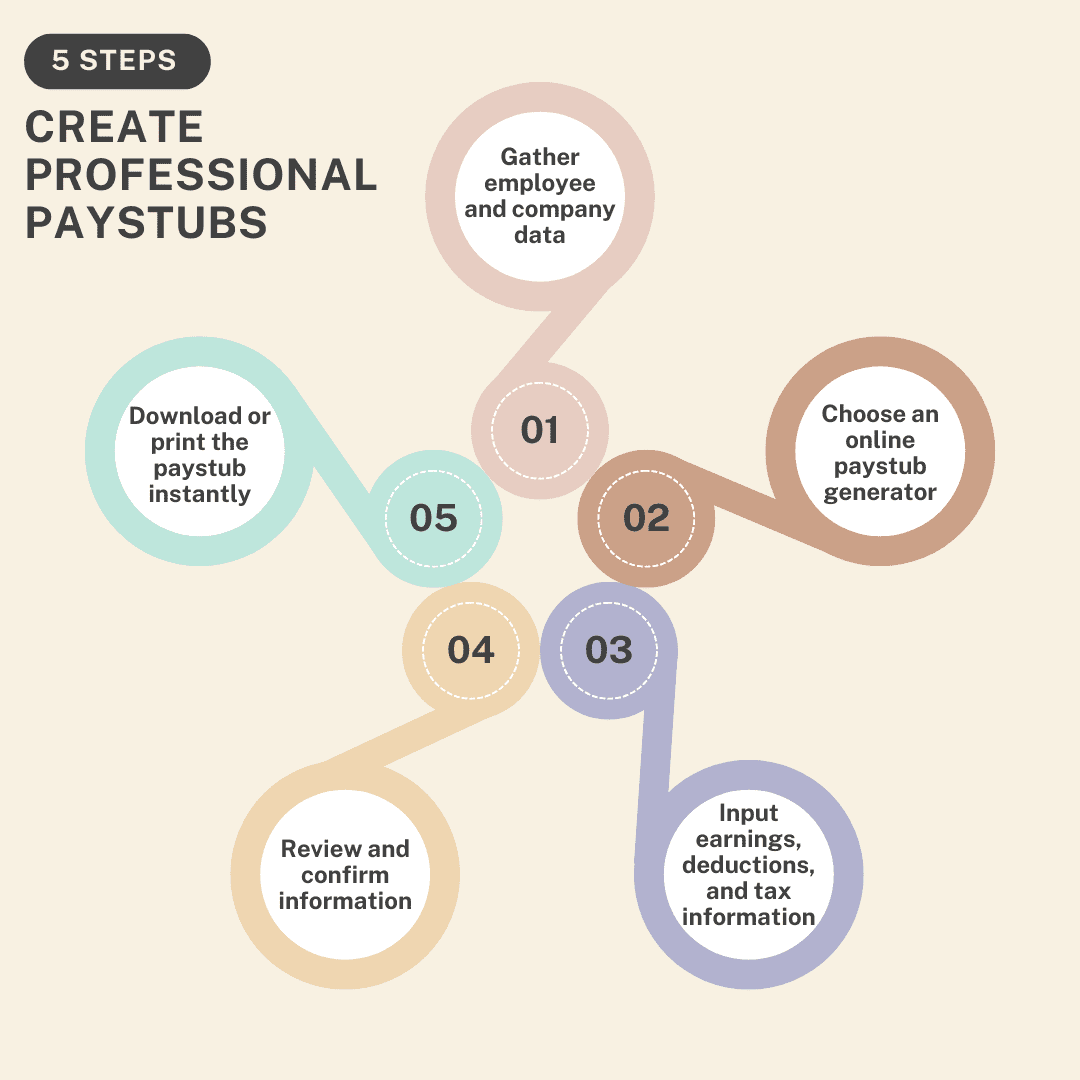
You can create a pay stub online by using a paystub generator. Simply enter employee details, earnings, deductions, and taxes, then download the generated pay stub instantly.

3. Are free pay stub generators reliable?

Free pay stub generators are reliable for basic use, especially for small businesses and freelancers. However, they may have limited features and lower security compared to paid tools.

4. What information is required to generate a pay stub?

To generate a pay stub, you need employee details, employer information, gross wages, deductions (taxes, benefits), and net pay.

5. Can pay stubs be used as proof of income?

Yes, pay stubs are widely accepted as proof of income for loans, renting, and financial verification purposes.

6. What is the difference between gross pay and net pay?

Gross pay is the total earnings before deductions, while net pay is the amount an employee receives after taxes and deductions are applied.

7. Is it legal to create your own pay stubs?

Yes, creating your own pay stubs is legal as long as the information provided is accurate and not used for fraudulent purposes.

8. How often should pay stubs be reviewed?

Pay stubs should be reviewed every pay period to ensure accuracy in wages, deductions, and tax withholdings.

9. What is the step-by-step guide to using a paystub generator online?

Step-by-step guide to using a paystub generator online: enter employee and employer details, add earnings and deductions, review the calculations, and then download or print the pay stub.

How to Verify a Payroll Stub: What Employers Should Look For?

A payroll stub verification is the process of checking a pay stub to ensure employee wages, taxes, and deductions are accurate and legitimate. Employers must review key details such as earnings, tax withholdings, and company information to detect payroll errors or fraudulent documents.

Why Payroll Stub Verification Matters?

Pay stub verification is a crucial step in the pay stub generation process. To generate an accurate pay stub, you need a reliable payroll check stub generator which you can easily get at Paystub Generator Free. A pay stub is a document provided by the employer that highlights an employee’s earnings and deductions.

A pay stub is a ticket to an individual’s financial situation, detailing gross income, taxes, deductions, and the net income that an employee takes home.

Verifying the authenticity of a pay stub is essential, especially in situations where an individual’s income information plays an important role on a pay stub.

For example, landlords generally require income verification to ensure that potential tenants can afford the rent. Similarly, lenders need this information to assess a person’s eligibility for a loan.

Steps For Verifying Your Pay Stubs

The first step is to check the numbers carefully. Although it might seem odd and tedious, numbers and math are vital parts of the pay stub verification process.

The next step is to verify the employer’s information provided on a pay stub. By cross-checking the employer’s details, such as name and address, with public records, you can ascertain their authenticity.

The third step is to be consistent. You should pay extreme attention to the formatting of the pay stub. If there are inconsistencies in the format or layout of the pay stub, it is recommended that you do not proceed with that document as it is not authentic.

Digital vs. Paper Payroll Check Generator: Which is Better for Your Business?

Are Payroll Check Errors Illegal?

Payroll check errors will lead you to legal ramifications, making it essential for businesses to handle payroll with utmost accuracy and compliance. While making a general error is not an illegal mistake in itself, failing to correct the payroll mistakes can result in a violation of federal and state laws.

For example, underpaying employees shall breach the Fair Labor Standards Act (FLSA), leading to penalties. Additionally, inaccuracy in tax withholdings and reporting can trigger audits and fines from the Internal Revenue Service (IRS).

A consistent check stubs error can also damage a firm’s reputation, potentially resulting in legal disputes and a loss of trust among employees. Therefore, it is important for businesses to ensure that their payroll processes are accurate and compliant and are reviewed on a regular basis to avoid any legal consequences.

Key Information Employers Should Expect on Payroll Stubs

There are some crucial information on a pay stub that should be examined carefully by employers:

Employee Details:

Employee details include the full name, employee ID, address, and social security number. This establishes the record’s trustworthiness and highlights that the payment is made to the employee.

Employer Details:

Employer details contain the firm’s address, official email address, and contact details. They ensure that the employer pays the employee’s salary.

Pay Period:

Different employers have different pay periods. They can be weekly, bi-weekly, or monthly. This section clarifies the payment made on a specific date, the calendar dates covered by the paycheck stub. For example, a pay stub might have a pay date of 1/1/24 to 1/11/24 for a month’s pay period.

Tax Deductions and Withholdings

To determine the correct federal tax withholding from your paycheck, you will need to finish your W-4 form. Your employer withholds this from your paycheck based on the information you fill in on your W-4 form.

The information includes:

  • Your filing status
  • Number of allowances marked

With other income and adjustments, you can increase your refund by changing your W-4 form to show the following information:

  • A high amount of income
  • Lower deduction
  • More extra withholding

State Tax Withholding:

If your state has an income tax, you will probably have state income tax withheld from your paycheck. Your employer will use the information provided on the state version of your W-4 form and your income to determine how much to withhold.

If you owe tax to more than one state, you might want to request that your employer withhold taxes from other states and withhold additional taxes from your work state. While you will likely have the state tax withholding on your paycheck, it solely depends on where you reside:

  • Not having state withholding
  • Have state withholding for more than one state
  • Have local withholding

Local Income Tax Withholding

If your city has a local income tax withholding, your employer will withhold local taxes. Rates and regulations vary depending on the location. Knowing if your employer withholds local taxes can help you in planning your plans and avoid any surprises when you file your taxes.

Other Deductions to Monitor

What are Health Insurance Premiums?

Health insurance premiums are the up-front cost of medical insurance. How you pay will depend on your access to the plan.

  • If you’re getting a healthcare plan from your employer, your medical insurance premiums are deducted from your paycheck.
  • If you getting health care coverage from Health Insurance Marketplace, you must pay premiums directly to the insurance company and not to the Health Insurance Marketplace.

What Factors Will be Determined if You Can Deduct Health Insurance Premiums?

Whether you can deduct the health insurance premiums on your taxes and the amount you are eligible to deduct will depend on factors such as:

  • Type of Insurance Plan: Medicare, healthcare insurance policies, and dental policies purchased via the ACA marketplace might be eligible for a deduction if you pay the premium out of your own pocket.
  • Employment Status: If you’re enrolled in an employer-sponsored health insurance plan, you can only deduct the portion of your premiums you pay out of your pocket if you have itemized deductions. However, self-employed individuals might be eligible to deduct up to 100% of qualified premiums that they pay even if they do not itemize deductions.
  • (AGI) Adjusted Gross Income: If you’re not self-employed, you can only deduct medical expenses, including health insurance premiums, if you itemize deductions.

Ensuring 401(k) or Other Retirement Contributions are Accurately Deducted

It is crucial to understand that it is not deductible. Until and unless you’re a business owner, you won’t claim a 401(k) contribution as a tax deduction when you fill out Form 1040. Just take the money out of your paycheck before federal taxes on your income are guessed out.

For example, you earn $85,000 per year and are jointly filing for marriage. This puts you in a 22% tax bracket. So, now you can get a fast estimate of how much you could potentially save by multiplying your 401(k) contributions by your tax bracket.

If you put the 10% aside, you might see a savings income of $1,870. However, this is not a wholly proven method, and your actual savings can vary depending on state and local income tax factors.

How to Create Professional Paystubs for Employees in Minutes?

Net Pay: What Employers Need to Double-Check

What is Net Pay?

If you’re a small business and are required to issue pay stubs under the Fair Labor Standards Act (FLSA), you will need to provide a full breakdown of exactly how much every staff member is taking home at the end of each pay period.

Most net pay is defined as gross pay before taxes, and net pay is after taxes, but there is a bit more to it. Mostly accepted net pay compensation definition is:

Gross Pay – Payroll Taxes – Other Deductions = Net Pay

How to Handle Common Errors and Discrepancies?

Below are the methods of handling common errors and discrepancies:

Failing to Include All The Revenue Sources:

One basic mistake individuals make while calculating net income is failing to include all the revenue sources. It is important to consider all the sources of income, including secondary sources of income such as side hustle. If you fail to include all of them, then it is an underestimation of net income.

Confusing Net Income With Gross Income:

Gross income refers to the total amount earned before any deductions, such as taxes, while net income is the amount left after all the deductions have been deducted.

Forgotten to Deduct All Expenses:

Deducting all expenses is crucial in calculating net pay. However, it is easy to forget to include some costs, such as internet bills and business travel expenses.

Using Incorrect Tax Rate:

Tax rates vary depending on the income bracket. Using the wrong tax rates can result in incorrect income calculations.

Common Payroll Stub Errors and How to Correct Them

Let us discover the most common payroll stub errors and understand how to correct them.

Misclassification of Employees:

One of the most common payroll check stub errors is misclassification. Correctly classifying employees as exempt or non-exempt under the Fair Labor Standards Act (FLSA) is crucial to compliance, and misclassification can lead to legal issues and penalties.

Why Does it Happen?:

Firms may misclassify workers to save on taxes and benefits because they lack an understanding of the legal definitions.

How Can You Avoid it?:

  • Conduct a regular audit of your workforce.
  • Thoroughly review the IRS guidelines on worker classification.
  • Consult with a legal expert when in doubt about an employee’s status.

Incorrect Calculation of Overtime Pay:

Over-time calculations are tricky when dealing with different pay rates, shift differences, or non-discretionary bonuses.

Why Does it Happen?:

Misunderstanding of labor laws and manual calculation errors.

How Can You Avoid it?:

  • Keep yourself updated with the Fair Labor Standards Act (FLSA) overtime rules.
  • Carry out an automated time-tracking system.
  • Regularly review and update the overtime policies.

Inaccurate Tax Withholdings:

Tax withholdings can be problematic because they often go unnoticed until tax filing time arrives, at which point correcting them becomes more complicated. 

Why Does it Happen?:

Outdated W-4 forms, error in payroll software settings.

How Can You Avoid It?:

  • Encourage employees to review and update their W-4 forms on a regular basis.
  • Stay informed on the tax laws and regulations, and then update your payroll system accordingly.
  • Conduct periodic audits of tax withholdings.

Failing to Account for Paid Time Off (PTO):

Inaccurate tracking and calculation of PTO can lead to overpayments or underpayments. PTO management becomes even more complex when you’re dealing with different types of leave, such as sick leave and personal days.

Why Does it Happen?:

Manual tracking error or lack of communication between HR and payroll departments.

How Can You Avoid it?:

  • Communicate PTO policies to all employees.
  • Regularly reconcile PTO balance.
  • Integrate a PTO tracking with your payroll system.

Key Takeaway

Employers must verify payroll stubs to guarantee accurate, compliant, and transparent payroll management. By carefully reviewing information such as employee identification, wages, deductions, taxes, and net pay, employers can avoid mistakes, protect against fraud, and preserve employee trust. In addition to ensuring payroll accuracy, routinely checking these stubs using reliable software such as a check stub generator aids in fulfilling legal requirements and maintaining the company’s reputation.

FAQs:

How to Verify a Payroll Stub?

To verify a payroll stub, check that employee and employer details are correct, confirm the pay period and pay date, and review earnings, deductions, and net pay for accuracy. Cross-check tax withholdings and benefits with official records or contracts. If anything looks incorrect, contact the employer or payroll provider for clarification.

How can I verify if a pay stub is real?
Check for accurate employer details, consistent formatting, correct tax calculations, and matching pay periods. You can also confirm details with the employer or payroll provider.

What should I check on a pay stub?
Review employee details, pay period, gross pay, deductions, taxes, and net pay to ensure everything is accurate and complete.

Can fake pay stubs be detected?
Yes, fake pay stubs often have incorrect calculations, missing tax details, inconsistent formatting, or unrealistic income figures.

Why is verifying a pay stub important?
It ensures accurate payment, prevents fraud, and helps confirm correct tax deductions and financial records.

Who can verify a pay stub?
Employers, payroll departments, lenders, landlords, and financial institutions can verify pay stubs for accuracy and authenticity.

What documents can support pay stub verification?
Bank statements, employment letters, tax forms (like W-2), and direct deposit records can help verify a pay stub.

How do employers ensure pay stub accuracy?
Employers use payroll software, automated calculations, and regular audits to ensure correct earnings and deductions.

Can I verify a pay stub online?
Yes, some payroll providers offer online portals where employees and employers can review and verify pay stub details.

What should I do if my pay stub has an error?
Report the issue to your employer or HR department immediately to correct any mistakes in earnings or deductions.

Digital vs. Paper Payroll Check Generator: Which is Better for Your Business?

Employers can provide employees with a record of their earnings and deductions through digital pay stubs and paper pay stubs. A pay stub can be generated using a Free Paystub generator, which is available on the market.

A pay stub is a document that showcases details of an employee’s earnings, deductions, and net earnings. Payroll Check Stubs are often provided in paper form and can be handed out in person or mailed to employees by their employers.

What is a Payroll Check Generator?

A Payroll check generator is a check that an employer issues to an employee for their work. The amount on the check solely depends on the employee’s gross pay, minus any deductions that are withheld from their paycheck.

A Payroll check generator ensures that employees are paid regularly and that their payroll taxes are withheld correctly. A Payroll check system helps track employee hours, vacation days, and other crucial information.

Types of Payroll Check Generators:

  • Digital Based Systems
  • Paper-Based Systems

Let us take a look at both of the above-mentioned payroll systems:

Digital Based Systems: 

With AI taking over and technology proliferating, many employers have started using digital-based payroll systems. These are digital versions of a paystub, typically accessible via an online portal.

Benefits of Digital-Based Systems:

  • Accessibility: You can access your pay stub anytime, anywhere, as long as you have a stable internet connection. This is helpful in case you need to check your earnings on the go.
  • Security: Most companies offer encrypted access to pay stubs, making it tougher for hackers to access financial information.
  • Faster Delivery: Electronic paystubs can be delivered faster, as you do not have to wait for them in your inbox.

 Paper-Based Systems:

With the rise in digital pay stubs, most of the companies will provide you with paper-based systems. A Paper-Based System is a printed document that will accompany your paycheck.

Benefits of Paper-Based Systems:

  • Physical Records: Some people opt to have paper pay stubs to review and keep them for their records. This is a better approach and an easier way to file away.
  • No Technical Skills Required: A Paper pay stub can be accessed by anyone, anywhere, and regardless of their comfort level with the technology, it can be generated by anyone.
  • Time-Consuming Process: Delivering paper pay stubs is a longer process than digital pay stubs, if mailed, which will lead to delays in receiving important information.

The Evolution of Payroll: From Paper to Digital

The evolution of payroll stub generators from paper-based methods to current sophisticated digital solutions mirrors the broader transformation of business processes in this digital age.

Early Days of Payroll Check Stub

Many, many years ago, payroll processing was laborious. Employers manually recorded employee hours and calculated wages, which often resulted in errors and inconsistencies. The paper-based system was time-consuming and also vulnerable to human error and fraud.

The process involved maintaining employee records, tax forms, and payment ledgers, making it a burdensome task for payroll checks.

Transition to Digital and Online Payroll Systems 

The Internet’s transformation and cloud computing revolutionized payroll systems. A cloud-based payroll system enables businesses to access their payroll data remotely, ensuring flexibility and efficiency.

These systems allow tracking real-time updates, making sure that regulatory tax changes are automatically incorporated. The integration of payroll systems with other business functions, such as time tracking, enhanced their utility, enabling a more comprehensive approach to employee management.

Broad Payroll Solution for Modern Businesses  

The complexity of current business processes demands comprehensive payroll solutions that can be managed through calculations and diverse datasets. Companies today seek an all-encompassing Payroll Check Stub generator that possesses withholding tax, benefits deductions, and various deductions in a single tool.

The advancement in payroll stub generators reflects a robust backbone that can adjust with real-time processes to legislative changes, a non-negotiable requirement in a dynamic landscape. This functionality underlines the technology-driven transformation payroll has undergone in recent years. 

Current Trends of Digital VS Paper Payroll

The current trends of Digital vs. paper Payroll include the following:

Flexible Payroll Solutions:

A flexible payroll solution is being designed to accommodate various payment structures and ensure accurate compensation for remote and gig workers. This might involve offering options such as accessing earned wages before payday to help the employees work remotely on a flexible schedule.

AI and Automation in Payroll Processing:

AI and automation are becoming an integral part of payroll processing, streamlining routine tasks and enhancing accuracy. From automated data entry to data validation and cleansing, tax compliance and reporting, employee self-service, and more, AI and automation are transforming almost every aspect of payroll.

Real-time Payroll Analytics and Insights:

The demand for real-time insights into payroll data is on the rise. Modern payroll software incorporates analytics tools that offer instant access to important payroll metrics. This empowers businesses to make data-driven decisions and adapt payroll strategies in response to changing business dynamics.

Payroll Data and Cybersecurity:

As a payroll system stores sensitive information, the importance of cybersecurity cannot be understated. Enhanced data security within payroll software has become a key priority, involving encryption protocols and multi-factor authentication to safeguard against potential cyber threats and unauthorized access.

Advantages of Digital Payroll Check Generators

Eliminates Human Errors: 

One of the primary advantages of creating pay stubs online is to significantly reduce human errors, as manual calculations are mostly prone to errors, which can lead to costly penalties and significant financial losses for businesses.

Using a payroll stub generator ensures that the state, federal, and local taxes applied to the employees are calculated based on the current payroll tax laws and requirements, thereby leaving no scope for errors.

Saves Time and Money:

Generating employee pay stubs manually involves a considerable amount of time, effort, and money. For example, hiring a resource for the manual creation of employee pay stubs can cost a lot of work, and that is also prone to human error.

With a Payroll Check Stub generator, you can simplify this slow process and save a lot of precious time and money. With the rise of online generators, employers can quickly generate employee pay stubs within minutes.

Easy Customization:

A properly generated pay stub will showcase your firm’s dedication and professionalism among employees and business clients. In the current era, a payroll check stub provides customizable pay stub templates that can be tailored to meet businesses’ needs.

Real-Time Access:

One of the most highlighting advantages of real-time payroll check stubs is their ability to provide real-time insights, which is essential for timely decision-making. With up-to-date information on wages and deductions, firms can plan their financial strategies effectively.

Moreover, the real-time access payroll processing system is designed to operate with low latency, which greatly improves the speed and accuracy of financial decisions. The low latency ensures that any payroll-related data is processed and is available almost immediately, facilitating a more dynamic and responsive financial planning process.

Compliance:

Legislative compliance is one of the primary challenges of a payroll system across the globe. With a payroll check generator, employers can solve this problem. With a reliable generator, you can calculate taxes based on the current payroll laws, making sure that the business remains in compliance with the tax laws and regulations. This reduces the risk of penalties and legal complications associated with non-compliance.

Advantages of Paper Payroll Check Generators

Eliminates Lengthy Calculations:

Now, creating Excel sheets and making long calculations are long gone. That can become a thing of the past with an online Payroll Check Stub generator. It is a paycheck calculator that handles all the math for you.

Cost and Time Efficient:

The digital solution of not only saving money on printing and distribution is also a precious period. Opting for a reliable payroll stub generator will make you more inclined towards your business goals.

Professionalism:

With a payroll check generator, you can customize them according to your firm’s needs. You can customize the information on pay stubs, like employee details, pay period dates, and deductions. Moreover, such tools have multiple professional-looking templates that can choose from and then tailor your needs.

Saves Time:

Cutting paper checks- and then signing and mailing them- can be tedious and time-consuming. Paperless payroll eliminates these processes and saves your business precious time. Additionally, you won’t have to spend time dealing with checks that are lost in the mail.

Drawbacks of Digital Payroll Check Generators

Loss of Control:

For organizations that have always done payroll in-house, switching to an outsourced provider can feel like a loss of control. However, having an online platform means you will have complete visibility into employee wage details and payroll cash requirements.

Security and Accuracy:

Not all companies are created equal. Organizations naturally harbor concerns about data security and whether mistakes will be made. Ensure that you speak with your potential providers about their security measures and controls.

Loss on the Current Financial Services:

Until and unless you are comfortable with getting these services discontinued, do not generate fake pay stubs. If your fraud is detected, these services are likely to be stopped, putting you in a probable financial crisis.

Key Takeaway:

Choosing between a digital and paper payroll check stub generator depends on factors such as firm size, security requirements, and scalability. Though a paper-based payroll stub offers simplicity and physical documentation, digital tools provide fast, efficient, and error-free payroll processing. Evaluate your firm’s needs to make informed decisions.

What Is a Pay Stub? A Complete Guide

What Is a Pay Stub?

A pay stub, also known as a check stub, shows an employee’s earnings, deductions, and take-home pay for a specific pay period. It helps track income, verify taxes, and serves as proof of income for loans, rentals, or financial records.

What Are Pay Stubs Used For?

Pay stubs serve multiple purposes for employees, employers, and freelancers:

  • Income Verification: Needed for loans, mortgages, and rental agreements
  • Tax Compliance: Ensures proper withholding of federal, state, and local taxes
  • Financial Tracking: Helps monitor overtime, bonuses, and deductions
  • Payroll Transparency: Employees can verify accurate payment
  • Legal Compliance: Some states require employers to provide pay stubs

Tools like a paystub generator simplify creating accurate pay stubs while reducing errors.

Pay Stub Example

A pay stub, also known as a check stub, is a document that shows an employee’s earnings, deductions, and net pay for a specific pay period. It helps track income, verify taxes, and serves as proof of payment.

You can create professional pay stubs using a paystub creator or by downloading ready-to-use templates here: PayStub Templates.

    What Is on a Pay Stub?

    The top of the pay stub displays the employer’s name and address, the beginning and ending dates of the pay period, and the employee’s and the employee’s name and address.

    The pay date is the actual day that the employee gets paid, and the pay period is the length of time the pay date covers.

    • Gross Wages: The total amount an employee earns before any deductions are taken out.
    • Net Pay: This is the amount that you take home after all deductions have been deducted.
    • Deductions: The amount that is deducted from the gross wages, such as taxes, benefits, and retirement contributions.
    • Federal Tax: The federal income tax deducted varies based on your earnings in accordance with federal laws. The more you make, the higher the rate of taxation. The minimum federal income tax rate is 10%. 
    • State Tax: The state tax deduction varies from state to state. For example, Florida has no state income tax. California, the state with the highest state income tax, has a rate of 13.3%.
    • Other Taxes: Depending on your location, you might observe deductions for local income taxes from your pay. Cities like Chicago have a high local tax rate, while other localities have no additional taxes at all.
    • Employee Benefits and Withholdings – Healthcare Benefits: This includes standard healthcare such as health insurance and vision plans.
    • Employee Benefits and Withholdings – Retirement: Retirement benefits mainly consist of leave encashment, retirement bonus, and the amount that employees contributed to their provident fund account throughout their service.

    What Key Information Does a Pay Stub Provide

           
    Step-by-Step Guide: How to Create Professional Paystubs in Minutes?

    • Step 1: Gather essential employee and company data: You should gather essential employee and company data to insert the data.
    • Step 2: Choose an online paystub generator or accounting software. Select a reliable paystub generator that you trust to do the job for you.
    • Step 3: Input earnings, deductions, and tax information: Insert earnings, deductions, and tax information to fill up the required information in the form.
    • Step 4: Review and confirm the accuracy of all information. Once you’ve completed the form, go through it thoroughly. 
    • Step 5: Download or print the paystub instantly: Click on the download button to download a professional paystub and print it for your records.

    Create Professional Paystubs

    Benefits of Using Paystub Generators

    • Time-saving benefits: Generate Paystubs in Minutes With a paystub generator at your disposal, your work gets much easier than the manual paystub process.
    • Ensuring Accuracy with Automated Calculations: Minimizing human errors via automation can help prevent costly mistakes, such as incorrect deductions, saving you from penalties.
    • Compliance with Labor Laws: A pay stub generator will automatically fill in the information based on the jurisdiction’s requirements.
    • Proof of Income: A professional pay stub is used as proof of income when applying for loans.
    • Financial Planning: A pay stub can help employees track their income and expenses, which is crucial for budgeting purposes.

    Key Features to Look for in a Paystub Generator

    • User-Friendly Interface: An easy-to-use interface can save you time and errors. Whether you’re an employer creating multiple pay stubs or an employee generating a single stub, the process is easy.
    • Customizable Templates: Different types of businesses have different needs, and a trustworthy pay stub generator offers customization options to cater to these variations.
    • Accuracy and Compliance: Errors in a pay stub can lead to legal issues, employee dissatisfaction, and financial discrepancies.
    • Accessibility and Convenience: A reliable pay stub generator is accessible from various devices and can be used anywhere, anytime.

     Conclusion

    Pay stubs, also known as check stubs, are essential for payroll transparency, financial planning, and legal compliance. Using a paystub generator ensures accurate, professional stubs.

    FAQ

    1. What Is a Pay Stub?

    A pay stub is a document that shows an employee’s earnings, deductions, and net pay for a specific pay period. It is used for income verification, tax filing, and financial tracking.

    2. Can pay stubs be created manually?

    Yes, spreadsheets can be used. A  paystub generator free tool ensures accuracy, consistency, and professional formatting.

    3. Are pay stubs legally required?

    Depends on the state. Some require detailed check stubs; others accept electronic or minimal records.

    4. What’s the difference between gross pay and net pay?

    Gross pay is total earnings before deductions. Net pay is the take-home amount after taxes and deductions.

    5. How long to keep pay stubs?

    Recommended 3–5 years for financial and tax records.

    Download Our App
    Now to Generate Paystub
    Instantly!

    © 2026 PAYSTUBGENERATORFREE.COM | ALL RIGHTS RESERVED